
.png)
Description
Download Anki Card Generator – AI‑Powered Flashcard Creation Tool
Overview
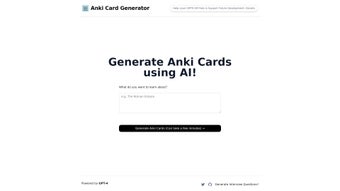
The Anki Card Generator is an AI‑driven, web‑based utility designed to eliminate the repetitive, manual steps involved in building Anki flashcards. Powered by OpenAI’s GPT‑4 model, the application accepts a short topic description, a paragraph of text, or even a list of bullet points and instantly returns a fully‑formatted .apkg deck ready for import into any Anki client. This approach saves users—students, language learners, professionals preparing certification exams, or anyone using spaced‑repetition—from hours of copy‑paste, formatting, and card‑type selection. Because all heavy‑lifting occurs on secure cloud servers, the local machine only needs a modern browser, making the tool accessible on Windows, macOS, Linux, ChromeOS, Android, and iOS. The interface is deliberately minimal: a single text box, a drop‑down for basic card type selection, and a “Generate” button. Once the generation process finishes, a download link appears, and the user can import the deck with a single click. While the generator currently focuses on the native Anki format and offers a limited set of post‑generation tweaks, its speed, accuracy, and zero‑cost model make it a compelling addition to any learner’s toolkit. The project is open‑source, hosted on GitHub, and supported by an active community that regularly publishes updates, bug fixes, and documentation. In short, Anki Card Generator transforms raw information into study‑ready flashcards in seconds, freeing mental bandwidth for actual learning.
Key Features
- AI‑powered content creation using GPT‑4, delivering context‑aware flashcards that match the input material’s tone and difficulty.
- One‑click generation of an
.apkgfile compatible with all official Anki desktop and mobile clients. - Automatic selection of appropriate card types—basic, cloze, or reverse—based on the structure of the supplied text.
- Responsive web interface that adapts to desktops, laptops, tablets, and smartphones without additional installations.
- Secure, server‑side processing ensures that no personal data is stored after the deck is generated.
- Open‑source code base on GitHub under an MIT license, encouraging community contributions and transparency.
- Built‑in handling of spaced‑repetition metadata, preserving Anki’s learning algorithm out‑of‑the‑box.
- Free to download and use, with optional donations for ongoing development and server costs.
- Regular updates and a public issue tracker that help maintain compatibility with the latest browsers and Anki versions.
- Multi‑platform support via any modern browser, eliminating the need for separate Windows, macOS, or Linux binaries.
Installation & Usage Guide
Getting started with Anki Card Generator requires only a web browser and an internet connection. Follow the detailed steps below to create your first AI‑enhanced flashcard deck.
- Download the package: Navigate to the official GitHub releases page at https://github.com/MartianGateway/anki-card-generator/releases and download the latest
anki-card-generator.ziparchive. - Extract the files: Unzip the archive to a folder of your choice. Inside you will find
index.html, ajsfolder, and supporting assets such as CSS and icon files. - Launch the application: Open
index.htmlby double‑clicking it or dragging it into Chrome, Edge, Firefox, or Safari. The page loads locally but forwards generation requests to the cloud backend. - Enter your source material: Type a concise topic (e.g., “Photosynthesis”) or paste a larger block of text. The tool can also accept bullet‑point lists, making it flexible for notes taken from lectures or textbooks.
- Choose card preferences (optional): Use the drop‑down menu to select “Basic”, “Cloze”, or “Reverse”. If left at “Auto”, the AI decides the most suitable type for each line of input.
- Generate the deck: Click the Generate button. A progress bar appears, indicating the request’s status. Simple inputs usually finish within 5‑10 seconds; more complex subjects may take up to a minute.
- Download the result: When processing completes, a download link for the
.apkgfile becomes visible. Click it to save the deck locally. - Import into Anki: Open your Anki desktop or mobile app, select File → Import, and choose the downloaded file. The new deck appears, named after the original topic.
- Fine‑tune (optional): After import, you can edit individual cards in Anki—add images, tweak wording, or adjust scheduling parameters.
- Seek help if needed: For common issues such as network timeouts or browser compatibility warnings, consult the “Issues” tab on the GitHub repository, where contributors frequently post solutions and workarounds.
In practice, the entire workflow—from download to a ready‑to‑study deck—takes less than three minutes, dramatically accelerating the flashcard creation process. Because the application runs locally, you retain full control over your files, while the AI engine remains securely hosted, ensuring a fast yet private experience.
Compatibility, Pros & Cons, and Frequently Asked Questions
Operating System Compatibility
As a browser‑based solution, Anki Card Generator works on any operating system that supports a modern web browser. Tested platforms include Windows 10/11, macOS Ventura and later, major Linux distributions (Ubuntu, Fedora, Debian), ChromeOS, Android 8+ and iOS 13+. Because the heavy AI processing happens on remote servers, the local machine only needs enough resources to run the UI, making the tool suitable for low‑spec laptops, tablets, and even shared public computers.
Pros
- Lightning‑fast AI generation eliminates manual card creation.
- Completely free and open‑source, fostering transparency and community involvement.
- Exports native
.apkgfiles ready for immediate import into any Anki client. - Cross‑platform support via any up‑to‑date browser (Windows, macOS, Linux, Android, iOS).
- Secure cloud processing—user data is not stored after deck generation.
- Active GitHub community provides regular updates and rapid bug fixes.
- No installation of heavy software; only a web browser is required.
- Supports multiple card types (basic, cloze, reverse) automatically.
Cons
- Requires a stable internet connection for every generation request.
- Limited post‑generation editing inside the web UI; users must rely on Anki for deeper customization.
- Only supports Anki’s native format; no direct export to other flashcard platforms.
- Interface is English‑only, which may be a barrier for non‑English speakers.
- Complex or highly technical topics can lead to longer processing times.
- No built‑in multimedia handling (images, audio) during generation.
FAQ
Do I need an Anki account to use the generator?
No. The generator only creates a .apkg file, which can be imported into any Anki installation without registering an account.
Can I generate cards in languages other than English?
The underlying GPT‑4 model understands many languages, but the web interface and prompts are English‑only. You can still paste non‑English text, though the quality of the output may vary.
Is my data stored on the server after generation?
No. Input data is processed in memory and discarded immediately after the .apkg file is created, ensuring privacy.
What browsers are officially supported?
Chrome, Edge, Firefox, and Safari (latest stable releases). Older browsers may experience rendering or compatibility issues.
Can I contribute to the project?
Absolutely. The source code is hosted on GitHub under an MIT license. Fork the repository, submit pull requests, or open issues to help improve the tool.
Is there a way to add images or audio to the generated cards?
Currently the generator creates text‑only cards. You can manually add media to individual cards after importing the deck into Anki.
Conclusion & Call to Action
In a world where efficient study habits can be the difference between success and mediocrity, Anki Card Generator delivers a practical, AI‑enhanced shortcut for anyone who relies on spaced‑repetition. By turning raw notes into polished flashcards in seconds, the tool frees valuable time for active recall and deeper learning. Its zero‑cost, open‑source nature, combined with cross‑platform browser compatibility, makes it accessible to a broad audience—from high‑school students cramming for exams to professionals preparing certifications. While the need for an internet connection and limited post‑generation customization are notable constraints, they are outweighed by the speed, accuracy, and convenience the generator provides. If you’re ready to accelerate your learning workflow, download Anki Card Generator today, generate your first deck within minutes, and experience a smoother path to mastery.
Pros: Fast AI generation, free, cross‑platform, secure, open‑source.
Cons: Requires internet, limited customization, English‑only UI, no media support.
Guides & Tutorials for Anki Card Generator
How to install Anki Card Generator
- Click the Preview / Download button above.
- Once redirected, accept the terms and click Install.
- Wait for the Anki Card Generator download to finish on your device.
How to use Anki Card Generator
This software is primarily used for its core features described above. Open the app after installation to explore its capabilities.
User Reviews for Anki Card Generator 0
No reviews found




